Once an assistant emails figures to colleagues on a schedule, it has joined your reporting. Give that email the source, definition, as-of time, owner, and check a dashboard gets, or the company can end up with two sets of numbers.
Take a request like this. Someone asks an assistant in a chat: every Monday morning, summarize last week's pipeline and email it to the sales team. Suppose the emails are useful. A month later, several people read them before the weekly meeting, and some have stopped opening the dashboard.
Then the email and the dashboard disagree. The dashboard reads from the warehouse. The email read a spreadsheet that someone saved from the CRM and has been updating by hand ever since. Both call the figure pipeline. The meeting opens with an argument about which one is right.
Our position comes from warehouse and reporting work. A recurring email that puts figures in front of people who act on them is a report, whoever set it up and whatever tool sends it. It should meet the bar a dashboard meets. What is new is how easy it has become to create one without noticing.
What turns a summary into a report
When you read a chat answer yourself, you can check what it drew on and ask a follow-up before you use the number. A scheduled email can take that away. It recurs. It can reach people who did not write the instruction. And they may read the number without seeing what produced it.
Those are the properties of a report. In our reporting work, every metric gets an owner, a target, and a definition, and dashboards refresh from the warehouse, not from someone's export. A scheduled summary gets none of that unless someone writes it in. Its definition is whatever the model took the word to mean. Its source is whatever file the instruction pointed at. It carries the date it was sent, which says nothing about when its data was cut. Its owner is the person who typed the request, who may not know they own anything.
The point of one governed warehouse is that reports, automation, and AI start from the same numbers. A summary built on an export starts somewhere else, and it can reach the same readers as the dashboard.
Write the contract into the task
The fix we recommend is five lines, written into the instruction the assistant runs and carried in every email it sends.
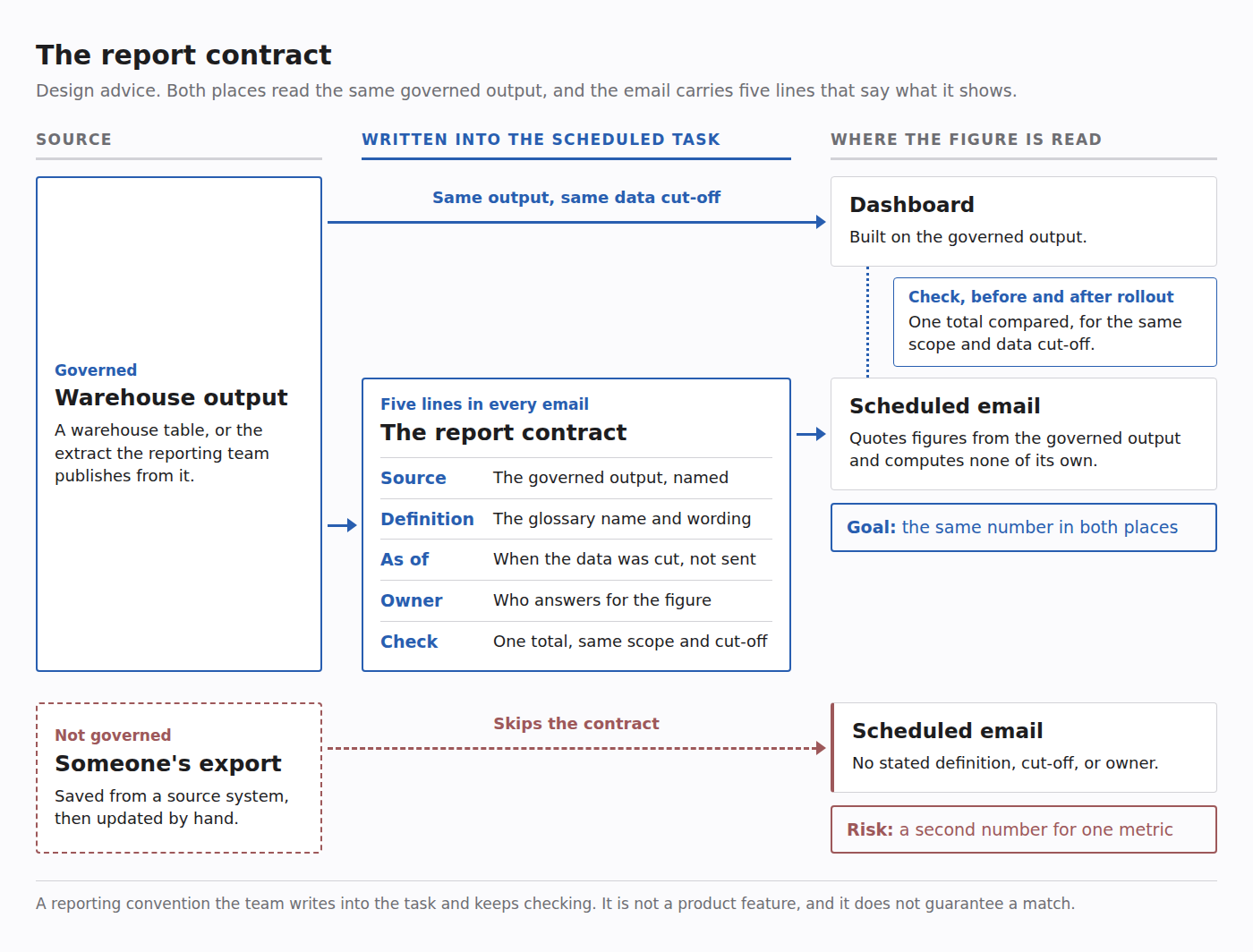
- Source. Name the governed output the dashboard is built on: the warehouse table, or the extract the reporting team publishes from it. If it is missing or out of date, the email should say so, not fall back to another file.
- Definition. Use the metric's name from the glossary and quote the glossary wording at the foot of the email. If pipeline means open opportunities past a qualifying stage, the email should say so, in those words.
- As of. State when the data was cut, not when the email went out. A Monday email built on a table last loaded on Friday should say Friday.
- Owner. Name the person who answers for the figure, usually the metric's owner in the glossary.
- Check. Pick one total that also appears on the dashboard, for the same scope, filters, and data cut-off. Someone compares the two before the email reaches a wider list, and keeps comparing after.
None of this is a product feature. It is the convention our reporting work applies to dashboards, written into a scheduled instruction. Writing it down does not mean the assistant will follow it every time. A model can misread a column, apply the wrong filter, or pick up the wrong cut-off. That is why the check is on the list.
Keep the arithmetic out of the prose
The less obvious risk is the words. A summary is a model writing about numbers, and the writing can add figures that no dashboard shows: a percentage change it worked out, a rounded total, a ranking, a "strongest week this quarter." Each one is a new metric with no definition and no owner.
Our rule is that the email quotes figures from the governed output and computes none of its own. If the week-over-week change matters, it belongs in the governed output, defined once, so the dashboard and the email can show the same change. Names too: if the glossary separates bookings from revenue, the instruction asks for the glossary name on every figure.
That leaves the summary the job it does well: saying which lines moved and pointing to the detail, in plain sentences. None of that needs a new number.
What IQ Chat does today
The advice above holds with any tool. This section is product fact, with release dates, and the email rules are also on our security page.
- Scheduled tasks (18 September 2026). A person asks in a chat for an instruction to run on a schedule, and each run produces a full chat reply. Administrators choose which workspaces and users can use scheduled tasks.
- Emailed results (22 November 2026). A scheduled task can email a successful run's answer, and the files the run made if the person chooses, to the recipients that person set for the task.
- Who can receive it. Sent through the workspace's email settings, the email can go only to that person and active members of the workspace. Sent from the person's own Microsoft 365 or Gmail mailbox, it can go to anyone they name. Microsoft 365 sends only once that person has allowed sending.
- Data protection. Where the workspace's data protection is on, an email to anyone but that person is checked first, and one that draws a warning is held, not sent. Content a run reads cannot change where its email goes.
- When it fails. A failed email raises a notification, and the task's row says why the last email did not go.
Those controls govern where the email can go and what data protection stops. Whether the figure inside it matches the dashboard is a reporting question. For a summary with figures in it, we would start with the workspace's own email settings, which keep the recipients inside the workspace while the check is still new.
Tie it out, then keep checking
Treat a new scheduled summary the way a warehouse team treats a new source: validate it against the original before anyone relies on it.
Send the first runs to the person who set up the task and no one else. On each run, compare the checked total with the dashboard, like with like: the same metric, filters, period, and data cut-off. A dashboard that has loaded newer data since the email ran can differ for a good reason. When the totals match on that basis for several runs in a row, widen the list.
If they do not match, find out why before anyone else reads the email. The cause can be the source, the definition, a filter, a different cut-off, or the model copying a figure wrong. Fix it where it starts: in the governed output, the glossary, or the instruction.
The check does not stop once the list is wider. Sources and definitions change, and a model can make a different mistake next week. Keep comparing for as long as the email goes out.
Then settle ownership. The person who set up the task and the metric's owner can be different people. Write both into the email: one keeps the task running, the other answers for the number.
When a definition changes in the glossary, every scheduled instruction that quotes the metric should change the same day, so keep a list of them next to the glossary. Our reporting projects finish by retiring the spreadsheets the reports replace. A scheduled email that repeats a dashboard from a different source is one more of those spreadsheets.
A scheduled summary is cheap to set up, and it should stay cheap. Five lines and a standing check will not guarantee that the Monday email matches the dashboard. They make it possible to see when it does not, and they make clear whose job it is to fix it.