In an automated process, the approval that works as a control sits at the step that changes something outside the workspace, and only if the approver sees the exact payload and the system runs exactly that.
When a process gets automated and a model does some of the steps, teams tend to land on one of three designs. A person confirms every step, and before long the confirmations tend to be clicked through unread. A person confirms nothing, and the first wrong email to a client ends the project. Or a person approves the request at the start, "send the monthly statements", and the automation takes it from there.
The third design looks like oversight, and that is the problem with it. It is recorded as a control while nobody has seen what goes out. The person approved an intention. What goes out is whatever the model steps produced afterwards.
Our position comes from process automation work and from building IQ Chat. Let the steps that change nothing outside run unattended, within policy. Hold the step that writes, and make the hold mean something.
Sort the steps by what they change
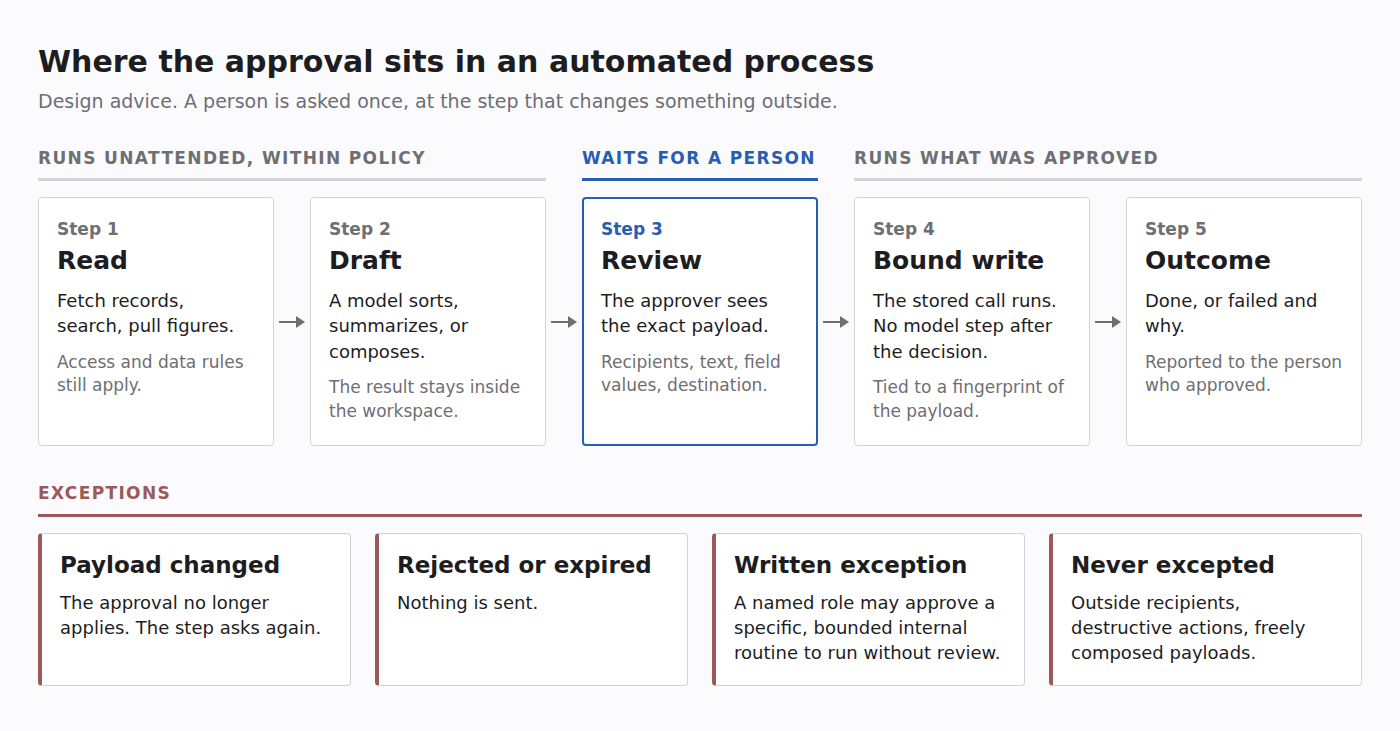
To decide where a person belongs, sort each step by what it changes. A step you cannot place counts as a write.
- Read. Fetch a record, search a mailbox, pull last month's figures.
- Draft. A model classifies, summarizes, or composes. The result stays inside the workspace.
- Write. Something changes outside the workspace: a message is sent, a record is updated, money moves, data is deleted.
Reads and drafts can be repeated or thrown away. A write cannot be taken back once a client has read the email, so that is where a person's attention goes.
This does not make every read safe. A read runs with somebody's access, and what it finds usually goes to a model. So reads stay under the same access and data rules as a person doing the work. The automation reads as a named owner, from the sources the process needs, and data that may not reach a given model may not reach it through an automation either. Unattended means no person approves each read. The rules still apply.
Show the approver the payload
"Approve sending the statement to the client" is a description. Between the description and the send sits a model step that chose a recipient, filled in an amount, and attached a file. Any of those can be wrong while the description stays true.
So the approver has to see the resolved payload: the actual recipients, the actual text, the actual field values, the destination, and whether that destination is outside the organization. A summary written by the model does not qualify. It is one more model output.
Bind the decision to what was reviewed
Showing the payload is half of the control. What runs also has to be what was shown. If the system regenerates the message after the click, or a retry resolves the inputs again, the approver signed off on a different object.
Four properties close that gap.
- The decision is tied to a fingerprint of the payload. If the payload changes, the approval no longer applies and the step asks again.
- Approving runs the stored call. No model step sits between the decision and the write.
- The approval expires. A rejected or expired approval sends nothing.
- It is decided once, in one signed-in place. A link in an email should not be able to approve anything.
After the write, the outcome goes back to the person who approved it: done, or failed and why.
What IQ Chat does today
Everything above is design advice and holds with any tooling. This section is product fact. Each item is a dated release, and the public highlights are on the What's new page. Administrators choose which of these capabilities each workspace can use, and some are in early access.
- Automations (22 September 2026). A process is laid out as steps, conditions, and approvals, and runs on a schedule or by hand. External writes wait for an approval step by default, and the approval is bound to the resolved payload. Test runs are simulated or use live reads.
- Agents that work on their own (early access, 12 October 2026). On an agent's run, a call to a connected tool that is not marked read-only goes to the agent's owner for approval instead of running, unless it was preapproved. The owner sees the exact arguments. The decision is bound to a hash of the payload, expires, and is made once. Approving runs the stored call with no model in the loop.
- One place to decide (28 October 2026). Where a workspace runs personal assistants, approvals from a person's agents appear on the assistant's page with the message or the exact details. An approved change reports how it went, and a failure says why.
- Slack in chat (early access, 14 November 2026). A message the assistant drafts is stored and not posted. It is sent only when the person presses Send, and edited text is checked again first.
- Approvals by email (15 November 2026). Where a workspace runs personal assistants and a person switches on email for theirs, the assistant can email them the approvals that are waiting. No link in an email approves or rejects anything.
Write the exceptions down
Some writes do not need a person every time: a nightly file placed in an internal folder, a status field set from a fixed list. Holding those forever teaches people to approve without reading, and that habit spreads to the approvals that matter.
The rule in our published AI policy template is this. Before an unattended agent sends anything outside the organization, spends money, changes a system of record, or deletes data, a person approves that action, unless a named role has approved a written exception for a specific, bounded routine.
Our advice is that three things stay behind an approval whatever the exception says: anything addressed to people outside the organization, anything destructive, and any payload a model composes freely.
IQ Chat draws part of that line in the product. For agents in early access, tools can be preapproved only where an administrator allows preauthorized writes, and never destructive ones. A send from the agent's own email, Teams, or Slack account to people outside the organization always waits for the owner.
Run it beside the manual process, then read the queue
In our automation work, every step, handoff, and exception is mapped before anything is automated, and the automation runs alongside the manual process until the numbers match. With model steps in the process, the first runs should write nothing at all.
Once the process is live, the approval queue is the first measurement. For each held write, track three things:
- How often it is rejected, and the reason given.
- How often the approver has to correct the payload before it can go.
- How long it waits, and how many approvals expire.
A write that is approved unchanged, run after run, to a bounded internal destination is a candidate for a written exception. Unchanged approvals show that the payload was accepted, not that it was read or right. Before the exception is written, check a sample of those payloads against the source data and against what happened after the write. The named role still decides. Rejections that cluster on one reason point at the draft step or the source data, and the fix belongs there. Approvals that expire unread mean the wrong owner, or a step nobody needs.
Set the bar for an exception before reading the numbers. Otherwise convenience sets it.
The aim of process automation is that people handle only the exceptions. An approval at the write, showing the payload and bound to it, is how the process decides what reaches a person.